
Freedom app features
Private mentor messaging in Freedom app
Private mentor messaging is a text and voice conversation with human support staff, separate from a public community feed. In Freedom app, you can send a message through your account, choose what context to share and return to the conversation history.
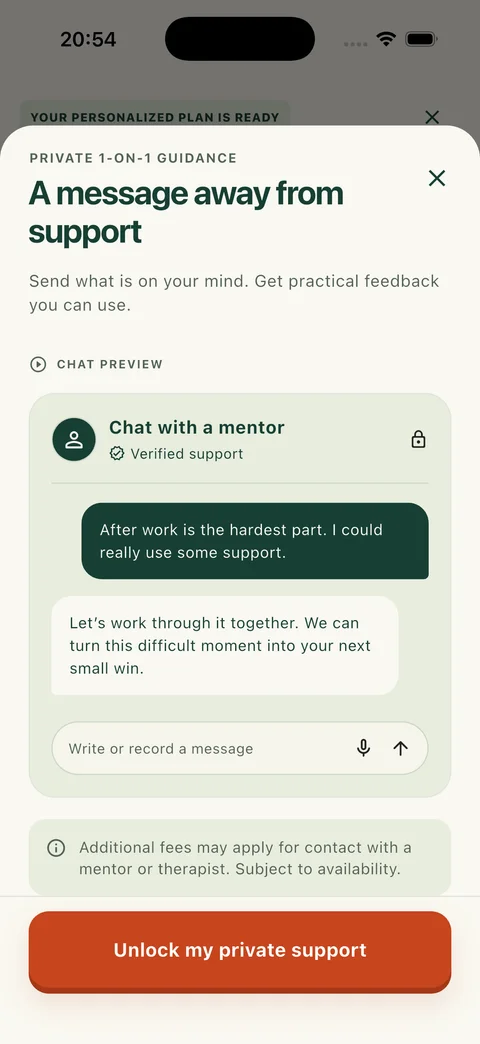
Private messaging in Freedom app
Stop Drinking Alcohol: Freedom is an iOS and Android app by SK LABS for adults who want to quit drinking, cut back or take a break. Private mentor messaging is available from Support, alongside the app’s breathing, grounding and focus tools.
Write a message or record a voice note
Open the mentor conversation from Support. You can describe a difficult evening, ask about using your plan or explain what you want to work on. There is no need to turn your message into a formal account of your drinking.
If speaking is easier, record a voice note of up to three minutes. Listen to it before sending, discard it if you want to start again, or send the recording when you are ready. Text and voice messages stay together in the conversation history.
This is a message conversation, not a live phone or video call. You can send your message and return to the same conversation later to check for replies. There is no appointment to book in this messaging flow.
Choose whether to include your goal and progress
Before sending, you can choose whether to include basic context about your current goal and program progress. The checkbox starts selected, so review it and turn it off if you want to send only your message.
This optional summary is separate from the PHQ-4 questionnaire in Health. Private lesson answers and notes stored on your device are not transmitted as mentor context. If there is something from a reflection you want to discuss, choose what to describe in your own message.
Understand who can read the conversation
Mentor conversations are private from other community members and linked to your app account. Authorized support staff can access messages to provide the service. Private does not mean anonymous to SK LABS.
Before your first message under the current terms, the app asks you to agree to the displayed messaging conditions. A privacy banner and the conversation’s terms explain the account link and staff access. You can revisit the history and delete your own messages using the conversation controls.
Start with the situation you want to discuss
A useful first message can be brief: “I usually drink after work. I have planned an alcohol-free evening, but getting home is the difficult part. I would like to talk through that plan.” This is an example, not a real member message.
Include the part you want help thinking through and anything you have already tried. If a reply arrives, you can read it alongside your earlier messages and continue the same conversation.
Availability and scope of support
Replies depend on staff availability, with no guaranteed response time or continuous monitoring. Mentor messaging is not an emergency service or medical treatment; do not wait for a chat reply if you need urgent help. Additional mentor or therapist services may have separate fees and availability.
Membership terms and any trial eligibility are shown before purchase. For a broader comparison of app mentoring, peer groups and clinical support, read our guide to choosing private help.
Key takeaways
- Send a text or a voice note of up to three minutes from Support; preview recordings before sending.
- Choose whether to share your goal and program progress. Your private lesson notes are not attached.
- Messages stay outside Community and are accessible to authorized support staff. Reply timing depends on staff availability.
Private Mentor FAQ
Can I listen to a voice note before I send it?
Yes. Record a note of up to three minutes, preview it and choose whether to send or discard it. Recording does not itself send the message.
Will community members see my mentor messages?
No. Mentor messages are separate from the community feed. They are linked to your account and accessible to authorized support staff.
Do I have to share my program context?
No. Review the context checkbox before sending and deselect it to send without the optional goal and progress summary. Private on-device lesson notes are not included.
Is this a conversation with another app member?
No. Private mentor messages go to human support staff. Member discussions take place in Community; the mentor conversation is a separate service.
Is mentor messaging a live call or an AI chatbot?
Neither. It is an account-based message conversation with human support staff. You send text or recorded voice notes and return to the conversation to check for replies; it does not connect you to a live phone or video call.
How quickly will a mentor reply?
There is no guaranteed response time. Replies depend on staff availability, and the conversation is not continuously monitored. For a short activity while you wait, the Support tab also contains breathing, grounding and focus tools.
Use text or voice to explain what is difficult
Get Freedom app to access private mentor messaging alongside your plan, progress and Support tools.